

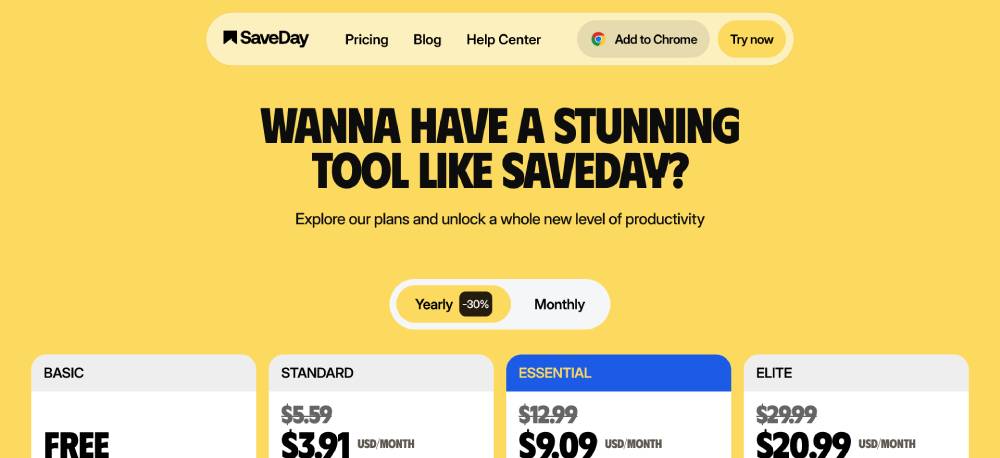
Creating a transparent and effective pricing page is essential for converting website visitors into paying customers. Many potential buyers gauge whether a product or service is right for them based on pricing structure and overall ease of understanding. By studying a variety of pricing page examples, businesses can learn what works for top brands and tailor their own pages to drive trust and conversions from the start.
A well-designed pricing page does more than display costs. It helps users make confident decisions, alleviates doubts, and streamlines the purchasing process. With consumer expectations and digital behaviors continually evolving, businesses must prioritize clarity, accessibility, and credibility above all else.
Every detail, from plan options to call-to-action placement, shapes the user’s journey. By blending transparency and design best practices, it is possible to boost conversion rates while building a positive brand reputation.
Integrating real testimonials, addressing common objections, and making the experience mobile-friendly are just some of the elements top brands use to increase sign-ups and subscriptions. Focusing on these aspects ensures the pricing page remains effective for a diverse audience.
Key Takeaways
- Show Your Pricing Upfront: Displaying prices clearly builds credibility and can increase conversion rates.
- Limit Plan Options: Narrowing choices to three or four options prevents decision fatigue and guides user decisions.
- Highlight the Most Popular Plan: Visually emphasize the most recommended plan to help users choose efficiently.
- Use Clear and Simple Language: Explain plans without jargon so users can quickly grasp what’s on offer.
- Incorporate Social Proof: Add testimonials and trusted company logos to establish reliability near call-to-action buttons.
1. Show Your Pricing Upfront
One of the most frustrating experiences for potential customers is having to hunt for pricing details. Hiding prices behind “Contact Us” forms or requiring users to jump through hoops can dampen trust and deter sign-ups. According to TechTarget, businesses that are open about pricing enjoy stronger customer loyalty and higher conversion rates. Clearly display all pricing options so users can predict costs, plan effectively, and move forward with confidence.
2. Limit Plan Options to Prevent Decision Paralysis
When visitors face too many choices, decision-making becomes overwhelming. Studies show that providing three to four plan options is optimal. This limited selection streamlines the user experience and increases the likelihood they will commit to a plan. Excessive options can actually deter sales by creating unnecessary confusion. Instead, present thoughtfully crafted plans that match distinct customer needs and usage levels.
3. Highlight the Most Popular Plan
Not all plan options are equal in your users’ eyes. Guiding prospective customers to the best fit helps them make decisions quickly. Visually emphasizing the “Most Popular” or “Recommended” plan—using a contrasting color, prominent badge, or larger box—signals where most users find value. This tactic leverages social proof and simplifies the decision-making process.
4. Use Clear and Simple Language
Clarity is foundational to any successful pricing page. Use language that is direct, simple, and free of industry jargon. A clear copy helps visitors understand features, benefits, and plan distinctions at a glance. For example, replacing “Advanced workflow orchestration engine” with “Automate any workflow in 2 clicks” provides instant recognition of value. Ensure descriptions are accessible to all levels of experience.
5. Incorporate Social Proof Near Call-to-Action Buttons
Conversion rates increase when users feel secure in their choice. Placing customer testimonials, star ratings, or company logos near pricing call-to-action buttons gives social verification right where it matters most. This approach reduces hesitation at the critical decision point. Authentic social proof is one of the top drivers behind purchasing decisions for both new and returning customers.
6. Offer a Free Trial or Freemium Option
Allowing users to try your product before committing reduces risk and can substantially boost sign-ups. Free trial periods or freemium plans lower entry barriers, build engagement, and increase conversion rates as users get hands-on experience with core features. Once customers begin seeing value, they are more likely to upgrade to paid plans or recommend your service to others.
7. Address Common Objections with an FAQ Section
Underneath the pricing table, an FAQ section proactively addresses customer concerns, including refund policies, cancellation terms, and security guarantees. Well-crafted FAQs minimize hesitation and reassure users that they are making informed choices. Being up front with this information demonstrates transparency and a commitment to customer satisfaction.
8. Ensure Mobile Responsiveness
More people than ever are browsing and making purchases from their mobile devices. That makes mobile responsiveness non-negotiable for pricing pages. Compact, flexible layouts, readable text, and thumb-friendly call-to-action buttons make it easy for users to compare plans and sign up without frustration—even on the smallest screens.
Conclusion
Designing a successful pricing page blends behavioral science, transparency, and modern design techniques. Businesses that clearly show pricing, limit options, guide choices through visual cues, use straightforward language, employ social proof, offer risk-free trials, and anticipate user questions consistently outperform competitors. Ensuring mobile compatibility guarantees these advantages reach the widest possible audience. By prioritizing these practices, any business can transform its pricing page into a reliable customer acquisition engine and foster lasting trust.
